Integrations
Face recognition in Home Assistant
Face recognition for Home Assistant via MQTT discovery: a device per camera, automations for arrivals, strangers and the doorbell, a live dashboard.
Applies from version 2.4.0
On this page
FaceStream.AI brings its cameras into Home Assistant by itself. Every camera becomes a device, with what it recognises, the face of the last arrival and a button to start a recognition, no YAML, no templates, no custom integration. It works through MQTT discovery, so Home Assistant needs its MQTT integration and a broker that both can reach.
FaceStream.AI reports; your automations in Home Assistant decide what happens next, a welcome scene, a message on your phone, the hallway light, the door.
What you need
| FaceStream.AI | Pro and up, the MQTT connection is part of Pro. The Recognise now button also needs Recognition on request, which Pro includes |
| Home Assistant | 2024.11 or later, with the MQTT integration set up |
| An MQTT broker | Reachable from Home Assistant and from FaceStream.AI. On Home Assistant OS, the official Mosquitto broker add-on is the easiest: once it runs, Home Assistant offers to set up the MQTT integration by itself |
| A broker user for FaceStream.AI | With the Mosquitto add-on, create a Home Assistant user, for example facestream, and use its name and password, the add-on accepts Home Assistant users |
Switch it on
- In FaceStream.AI, open Notifications and, under Connections, open the MQTT connection to the broker Home Assistant uses, or Add connection and choose MQTT.
- Broker is the address of the broker, with the Mosquitto add-on, the address of
Home Assistant, for example
192.168.1.30. Port1883, User and Password as created above. - Tick Home Assistant discovery. Leave Discovery prefix at
homeassistantunless you changed it in Home Assistant. - Save connections and rules.
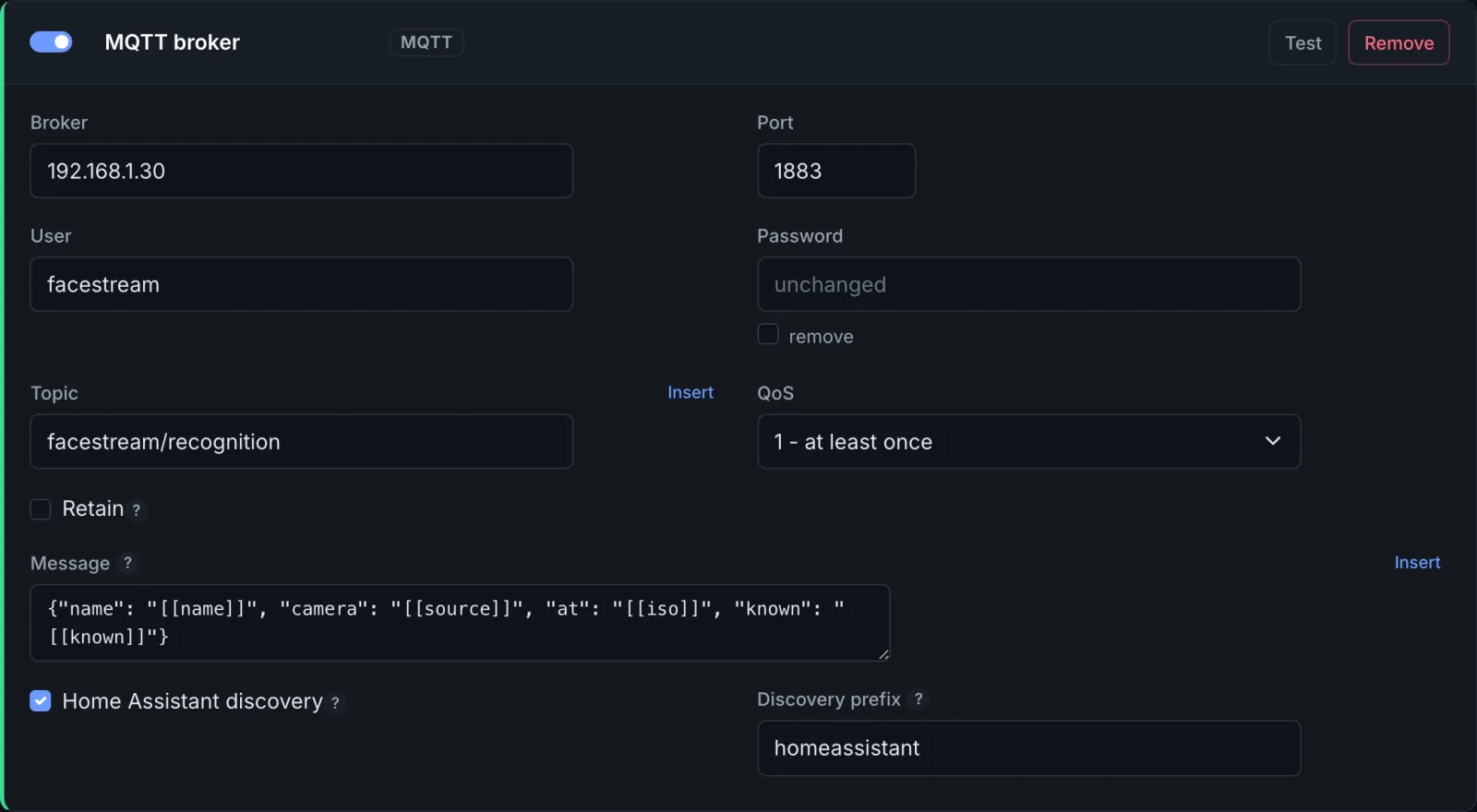
A few seconds later Home Assistant lists one device per camera under Settings → Devices & services → MQTT. Nothing needs restarting.
Topic and Message are for rules of your own; discovery does not use them. A rule is not needed either: every event of every camera reaches Home Assistant, whatever your rules say, and rules keep working as before for your own topics and wording.
What appears
Each camera is one device, named like the camera, so it can go into the room where it hangs.
| Entity | Type | What it shows |
|---|---|---|
| Recognition | Event | Every event of this camera. The event type is visit_started, visit_ended, unmatched, trigger or spoof, the same events a rule can react to. Its attributes carry name, known, liveness, duration, sightings, at, image_url and frame_url |
| Last person | Sensor | Who arrived last: a name, or Unknown |
| Last face | Image | The face photo of that arrival |
| Recognise now | Button | Starts a recognition at this camera, with the camera's own Look for, Attempts and Stop once recognised |
Home Assistant names the entities after the camera and the entity, so a camera called
Front Door gives event.front_door_recognition, sensor.front_door_last_person,
image.front_door_last_face and button.front_door_recognise_now. The settings of each
entity show the exact ID; the examples below use these.
Last person and Last face change when somebody arrives, a visit starting, or a face nobody could place. A visit ending, a suspected spoof and a request show up as events only.
When FaceStream.AI stops, or the broker loses it, its cameras show as unavailable.
One camera that stops delivering, unplugged, rebooting, a stream that drops away, goes unavailable on its own, shortly after its stream stops answering: four to fifteen seconds in our tests, depending on where the camera had got to. The other cameras carry on, and so does everything else FaceStream does. Recognise now cannot be pressed for a camera in that state: the request would reach nothing. Once the camera delivers again, it comes back within a second or two.
A camera you delete disappears from Home Assistant once FaceStream has restarted with the new camera list, which saving the cameras does by itself.
Automations
Every automation below reacts to the Recognition event entity and then looks at the event type and the attributes. Paste them in Settings → Automations & scenes → Create automation → Edit in YAML, and replace the entity IDs with yours.
not_from: unavailable keeps an automation from firing when a camera comes back after
being unavailable, that, too, changes the entity's state.
Welcome a family member home
alias: Welcome home, Amelia
triggers:
  - trigger: state
    entity_id: event.front_door_recognition
    not_from: unavailable
conditions:
  - condition: template
    value_template: >-
      {{ trigger.to_state.attributes.event_type == 'visit_started'
         and trigger.to_state.attributes.name == 'Amelia Hart' }}
actions:
  - action: scene.turn_on
    target:
      entity_id: scene.hallway_welcome
mode: single
For several people, compare with a list:
trigger.to_state.attributes.name in ['Amelia Hart', 'Tom Hart'].
A message with the photo when a stranger is at the door
At a camera set to On request only, a stranger arrives as unmatched; at a camera that
recognises continuously, as visit_started with known false. This covers both:
alias: Stranger at the front door
triggers:
  - trigger: state
    entity_id: event.front_door_recognition
    not_from: unavailable
conditions:
  - condition: template
    value_template: >-
      {% set e = trigger.to_state.attributes %}
      {{ e.event_type == 'unmatched'
         or (e.event_type == 'visit_started' and not e.known) }}
actions:
  - action: notify.mobile_app_your_phone
    data:
      title: Somebody at the front door
      message: Not recognised.
      data:
        image: "{{ trigger.to_state.attributes.frame_url or trigger.to_state.attributes.image_url }}"
mode: single
frame_url is the whole picture, image_url the face. Both open without signing in, but
your phone has to be able to reach FaceStream.AI's address, at home, or over a VPN.
Recognise whoever rings the bell
For a camera set to On request only: when the doorbell is pressed, Home Assistant presses Recognise now. Any doorbell Home Assistant knows about will do.
alias: Recognise whoever rings
triggers:
  - trigger: state
    entity_id: binary_sensor.front_door_bell
    to: "on"
actions:
  - action: button.press
    target:
      entity_id: button.front_door_recognise_now
mode: single
The answer arrives a moment later as an event on event.front_door_recognition: a name
if the camera recognised somebody, unmatched if it saw a face and could not place it,
nothing if nobody was there.
Opening a door
FaceStream.AI does not open doors; an automation of yours might. If it does, let it act
only on a visit_started of named people, only when the liveness check ran, liveness
is empty when it did not, and only right after somebody rang:
alias: Let the family in
triggers:
  - trigger: state
    entity_id: event.front_door_recognition
    not_from: unavailable
conditions:
  - condition: template
    value_template: >-
      {% set e = trigger.to_state.attributes %}
      {{ e.event_type == 'visit_started'
         and e.name in ['Amelia Hart', 'Tom Hart']
         and e.liveness is not none }}
  - condition: template
    value_template: >-
      {{ (now() - states.binary_sensor.front_door_bell.last_changed).total_seconds() < 30 }}
actions:
  - action: lock.unlock
    target:
      entity_id: lock.front_door
mode: single
Checking event_type matters: a suspected spoof carries the name of the person in the
photo, and an automation that only looks at name would let a printed photo in. The
liveness check stops a photo held up to the camera on the off chance; it does not stop
somebody who prepared. Decide for yourself whether a face may be the only key to your
door. Rules that open a door says more.
The live picture on a dashboard
Home Assistant can show FaceStream.AI's annotated picture, faces framed and named, like any other camera:
- In FaceStream.AI, open the camera's Trigger dialog and copy the Stream URL for
other systems,
http://192.168.1.20:8100/stream/front-door?token=…. - In Home Assistant, Settings → Devices & services → Add integration → MJPEG IP Camera, and paste it as the MJPEG URL. Leave the still image URL, user and password empty; the token in the address is the sign-in.
- Put the new camera entity on a dashboard with a picture entity card.
Next to it, a picture entity card for image.front_door_last_face and the sensor
sensor.front_door_last_person answer who was it? at a glance.
The face photo
Home Assistant fetches the photo from FaceStream itself, from the address the FaceStream
interface was last opened under. Open the interface once under an address Home Assistant
can reach, http://192.168.1.20:8000, not http://localhost:8000, and the photos
follow.
The link opens without signing in: anyone who has it can see that one photo, and it cannot be guessed from a name or a time.
Names and photo links are not kept on the broker. Only the device descriptions and the availability are, so the broker never holds on to who came last.
Topics
For anyone who wants to use them outside Home Assistant. <installation> is twelve
hexadecimal digits that stay the same for this installation; <camera> is the camera id,
with every character other than a letter, a digit, _ or - replaced by _.
| Topic | Direction | Payload |
|---|---|---|
homeassistant/device/facestream_<installation>/<camera>/config |
to Home Assistant, retained | the device and its entities |
facestream/<installation>/status |
to Home Assistant, retained | online or offline for the installation |
facestream/<installation>/<camera>/status |
to Home Assistant, retained | online or offline for this one camera |
facestream/<installation>/<camera>/event |
to Home Assistant | JSON with event_type and the attributes above |
facestream/<installation>/<camera>/person |
to Home Assistant | the name |
facestream/<installation>/<camera>/face |
to Home Assistant | the photo link |
facestream/<installation>/<camera>/request |
to FaceStream | PRESS starts a recognition |
Messages go out with the QoS of the connection.
Who can press the button
Anyone who can publish to the broker can start a recognition, just like anyone who holds a camera's trigger token. It starts a recognition and nothing else. Give the broker users and passwords, and FaceStream an account of its own.
When something does not show up
| What you see | What to check |
|---|---|
| No FaceStream device under MQTT | Is Home Assistant discovery ticked and saved? Do FaceStream.AI and Home Assistant use the same broker? Does the Discovery prefix match Home Assistant's? Notifications → Recent deliveries shows not connected to the broker when the broker refuses FaceStream.AI's sign-in or cannot be reached |
| The devices are there, but unavailable | FaceStream.AI is stopped, has lost the broker, or that camera delivers no picture, check its card on the Overview |
| Last face stays empty | Open the FaceStream.AI interface once by an address Home Assistant can reach, see The face photo |
| Your own rules do not change what Home Assistant gets | They are not meant to: discovery sends every event. Filter in the automation |
Home Assistant is a trademark of the Open Home Foundation. FaceStream.AI connects to it through the standard MQTT integration and is not affiliated with or endorsed by the Open Home Foundation.