Setting up
Recognition and requests
Continuous face recognition or recognition when the doorbell rings: the settings, the liveness check, the events and the trigger API.
On this page
FaceStream watches a camera stream, recognises the people you enrolled, and turns what it sees into events your own systems can act on. This page describes when it looks, what it reports, and how the settings change both.
Two ideas run through everything below, and they are worth separating early:
- A sighting is one recognition of one face in one picture.
- A visit is a run of sightings of the same person on the same camera with no gap longer than the Visit gap. The event log records visits, not sightings, that is the difference between "Norman, 14:32 to 14:37, 94 sightings" and ninety-four timestamps you cannot tell apart.
Two ways a camera recognises
Each camera decides for itself. There is no system-wide default it inherits: a door station waits for the bell, a yard camera runs all day, and that is a property of the camera rather than of the installation.
| Continuously | On request only | |
|---|---|---|
| When it recognises | all the time, every Interval frames | only while a request is running |
| What starts it | nothing, it just runs | a call to the trigger URL |
| Edition | any, including Free | Pro and up |
| Requests as well | yes, a request takes precedence over the interval | that is the only way |
| Marks in the video stream | permanent; trackers follow faces between recognitions | only while a request runs, then the picture goes clean |
| CPU | constant | only in bursts |
A request also resets the interval counter, so on a continuously running camera a doorbell press postpones the next regular recognition by one full interval.
The settings
Everything in the first block lives on the camera (Camera → the card → Trigger), except the Visit gap, which applies to the whole installation (Notifications, the slider at the top).
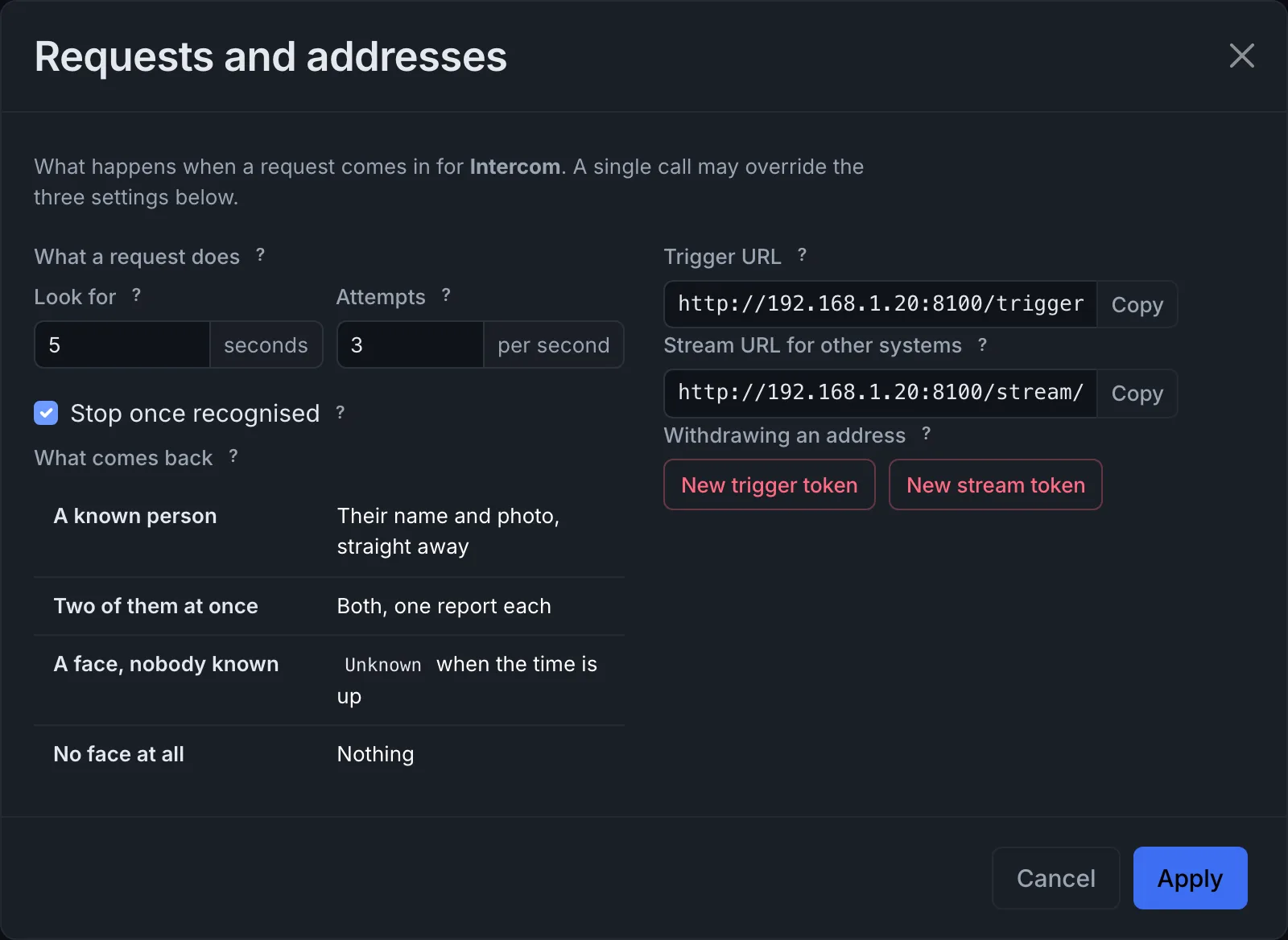
| Setting | Default | Range | What it does |
|---|---|---|---|
| When it recognises | Continuously | not available | Picks one of the two modes above |
| Check every … frames | 60 | 20 to 600 | Continuously only: how many frames are skipped between recognitions. Counted in frames, not seconds, at 15 fps, 60 frames is roughly four seconds. Lower means a faster reaction and more CPU load |
| Look for | 5 s | 0.5 to 120 s | How long one request keeps looking |
| Attempts | 3 /s | 0.5 to 20 /s | How often it looks while it does. A camera never runs two recognitions at once, so a very high rate simply means it looks again as soon as it can |
| Stop once recognised | on | not available | Ends the request the moment a known person is found. Other known people in the picture at that moment are still reported. Switched off, the camera keeps looking for the full time and reports anyone it recognises along the way |
| Visit gap | 30 s | 5 to 300 s | How long without a sighting before a visit counts as over. Applies to both modes |
Look for, Attempts and Stop once recognised are defaults that a single call may override, see the trigger API.
How a camera recognises a face
Each camera also decides how it looks at a face: how small a face may be, how close it has to come to a stored photo, and whether it is checked for being a picture of a person. A door station has the face filling the frame; a yard camera sees somebody twenty metres away. These settings are on the camera too (Camera → the card → Recognition). They take effect when you save the cameras, and recognition pauses briefly while it restarts.
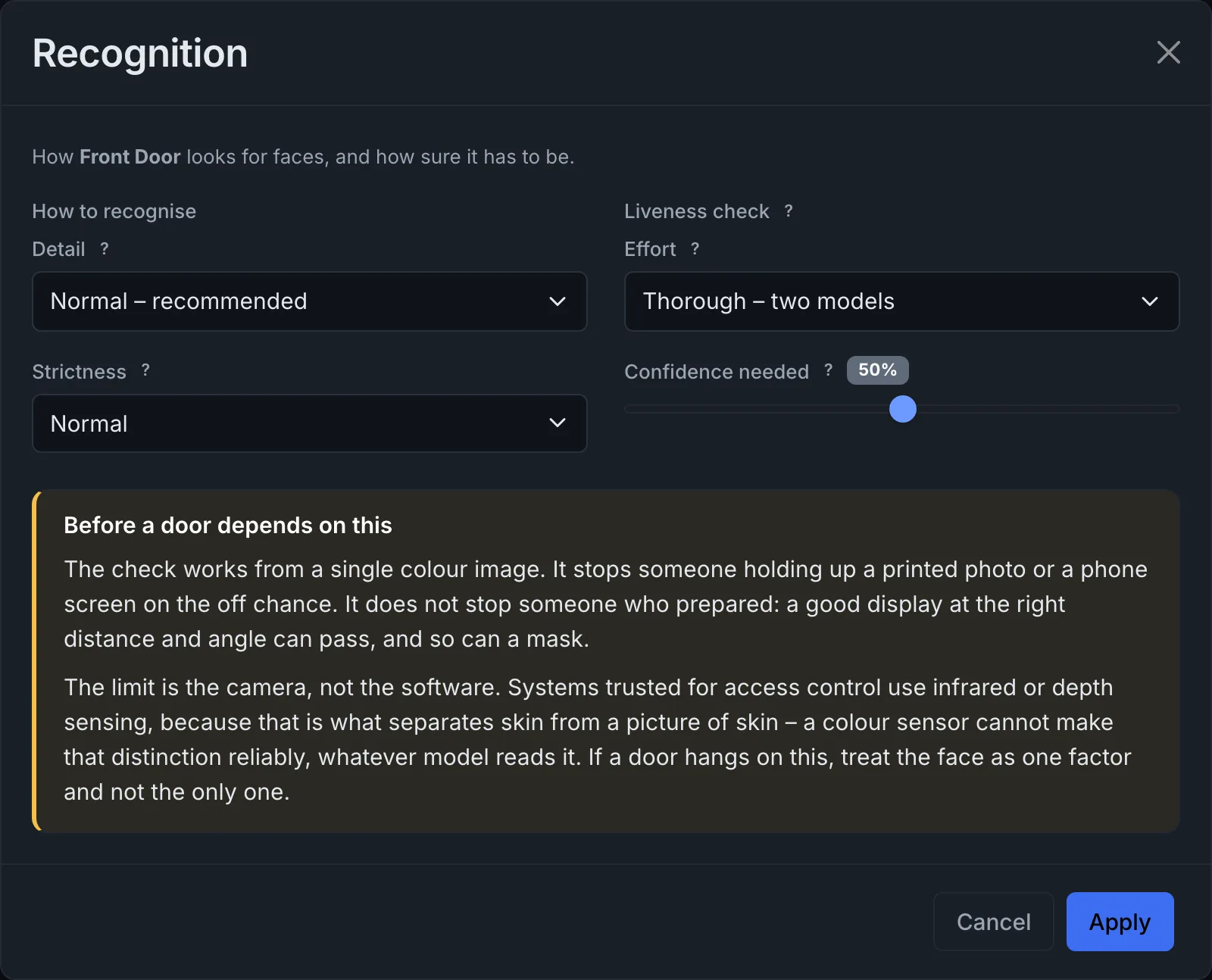
| Setting | Default | Choices | What it does |
|---|---|---|---|
| Detail | Normal | Low, Normal, High | How small a face may be and still be found. Higher settings enlarge the frame before searching, which costs proportionally more work |
| Strictness | Normal | Lenient, Normal, Strict | How close a face must be to a stored photo. Stricter means fewer mix-ups but more Unknown |
| Effort | Thorough | Off, Fast, Thorough | The liveness check: whether a face in front of the camera is a person or a picture of one. Thorough runs a second model on every face and costs more time than Fast |
| Confidence needed | 50 % | 10 to 90 % | How sure the liveness check has to be. Higher rejects more, and every rejection is recorded as a suspected spoof |
The liveness check is in Pro and up. Below that, Effort and Confidence needed keep what was set but have no effect, and apply again after an upgrade.
The check works from a single colour image. It stops somebody holding up a printed photo or a phone screen on the off chance; it does not stop somebody who prepared. If a door depends on it, treat the face as one factor and not the only one.
The check judges every picture on its own, so a photo held up to the camera can pass it in one picture out of many. For that reason a suspected spoof holds back the person it shows: while a suspected spoof of somebody is open on a camera, that camera does not start a visit for the same person. A visit begins once no suspicious picture of that person has come in for the Visit gap. A real person whom the check turned down once is therefore reported a Visit gap later, at a door, the safer of the two mistakes.
Earlier versions had these four settings once for the whole installation. Updating copies them into every camera that already exists, so each camera carries on exactly as before until you change it.
What one request reports
One request reports each person it recognises, once, however often the camera sees them while it looks.
| The camera sees | It reports |
|---|---|
| A known person | Their name and photo, straight away |
| Two known people | Both of them, one report each |
| The same person again | Nothing more, that is a repetition, not an answer |
| A face, but nobody known | Unknown with a photo, once the Look for time has run out |
| A known person and somebody unknown | The known person only. The other face is kept in the event log, but a request that recognised somebody does not also answer Unknown |
| No face at all | Nothing |
Three of those rows deserve a sentence.
Unknown waits on purpose. A visitor walking up to the door is often unrecognisable
in the first picture and perfectly clear in the fourth. Reporting Unknown immediately
would spend the answer on the worst view available, so the remaining seconds are spent
hoping for a better one. If the camera does place the person in that time, the Unknown
answer never happens.
Nothing means nothing. A request that saw no face at all stays silent, so that "nobody was there" stays distinguishable from "somebody was there and I did not recognise them". For a door station that distinction is the whole point.
Each person is reported once, not each request. Ring twice within the Visit gap and you get two answers, because two requests were asked. Stand in front of the camera for the full five seconds and you get one, because you are one person.
What arrives at your systems
Every report becomes an event. Which of them reach which channel is decided by your notification rules; this is the raw material they work with.
| Event | In rules | When it happens |
|---|---|---|
trigger |
Request received | A request came in, before anybody has been recognised. The bell was pressed, whoever is standing there |
visit_started |
Visit starts | A person's visit begins. In On request only this is the answer to a request; in Continuously it is every new visit, Unknown included |
unmatched |
Face without a match | A request ran out of time having seen a face without placing it, and without recognising anybody else |
spoof |
Suspected spoof | A face was judged to be a picture of a person rather than a person. It gets its own entry in the log and is never merged with a real visit. It carries the name of whoever the picture shows |
visit_ended |
Visit ends | A visit's Visit gap has passed with no further sighting. Carries the duration, the number of sightings and the liveness result. A suspected spoof does not end as a visit |
The first column is what Home Assistant, MQTT and the placeholder [[event]] carry; the
second is how the same event is called when you choose it for a rule.
A visit that was never announced never announces its end either. This matters in On request only: a second person in the same request is written to the log but not reported, and an ending without a beginning would be worse than silence.
Unknown visitors at a camera on request
At a camera set to On request only, somebody nobody recognises does not start a visit
that is reported as Visit starts. The request waits for its Look for time and then
answers with Face without a match, the unmatched event. A rule that should tell you
about strangers at the doorbell therefore reacts to Face without a match; a rule on
Visit starts with Unknown people only ever fires at a camera that recognises
continuously.
Which rule reacts to which of these events, at what times and how often, is set under Notifications, see Connections and rules, including the three safeguards for rules that open a door.
How visits are put together
Sightings are grouped into visits by name, camera and time. Two rules follow from that, and both are deliberate:
- Two cameras are two visits. Somebody seen at the front and at the back was in two places, not once in one.
- A suspected spoof never joins a real visit. It is a different event about a different thing.
Under Events, the details of a visit name the camera its photo came from. As soon as the log holds visits from more than one camera, every row names its camera too, and Camera narrows the list to one of them.
In On request only every look during a request is recorded, including the ones that
came back Unknown. A five-second request at three attempts per second therefore leaves
a visit of a dozen sightings spanning five seconds, not a single sighting of zero
length. The visit describes who was there and for how long; the request answers a
question. They are not the same job.
The trigger API
GET  /trigger?camera=<id>&token=<trigger token>
POST /trigger
The endpoint sits on the video port (8100 by default), not on the configuration port, so a request reaches the running recognition directly. The camera's own address, token included, is on the Trigger dialog of its card, ready to paste into a door station or a home-automation rule.
Parameters, all optional, all overriding the camera's defaults for this one call. Values outside the allowed range are clamped rather than rejected, and the response says what was actually used.
| Parameter | Meaning |
|---|---|
camera |
Which camera. Left out, the request goes to every camera |
duration |
Look for, in seconds (0.5 to 120) |
fps |
Attempts per second (0.1 to 20) |
stop_on_match |
1/0, Stop once recognised |
Parameters may be sent as a query string, as form fields, or as a JSON body.
Authentication, either a signed-in session, or the camera's trigger token, as
?token=… or as an Authorization: Bearer … header. A token belongs to one camera: a
request without camera needs a token that fits every camera, so that the key you hand
to a doorbell cannot wake the whole installation.
Responses
| Status | Body |
|---|---|
200 |
{"status": "ok", "cameras": [{"id": "…", "duration": 5.0, "fps": 3.0, "stop_on_match": true}]}, one entry per camera the request opened, with the values after clamping |
400 |
{"status": "error", "message": "Invalid parameter: …"} |
401 |
{"status": "error", "message": "Sign in, or use the camera's trigger token."} |
403 |
{"status": "error", "message": "Recognition on request needs the pro edition; …"} |
404 |
{"status": "error", "message": "No camera <id>"} |
The call returns as soon as the window is open. It does not wait for the answer, the answer travels as an event over the channels you configured, because looking takes seconds and an HTTP request that waits for it would be a timeout waiting to happen.
A note on tokens. Both the trigger address and the stream address carry a token instead of a password, because a door station cannot sign in and an embedded video stream cannot hold a session. Anyone who has one can use it, so treat them like a key. Issuing a new token takes effect on saving and makes the old address stop working, that is how one is withdrawn.